Mobile clock-in
For teams using their own phones.
Clock in on your own device, with location and identity checks set for office, site or remote work.
Create workspace
Capture attendance, review exceptions, and prepare approved timesheets for payroll and client billing, without chasing paper registers and spreadsheets.
See what was scheduled, what was recorded, and what is ready to pay.
The agreed working hours, shifts and breaks.
Clock-in and clock-out times, or work confirmed by a client.
Reviewed hours after your break, grace-period and overtime rules.
A one-hour unpaid break and no approved overtime. Arriving early or leaving late does not automatically add payable hours. Your organisation's rules apply.
Find the attendance approach that fits your people and where they work.






For teams using their own phones.
Clock in on your own device, with location and identity checks set for office, site or remote work.
Create workspaceFor site-based teams using a pass.
Use face verification with a QR pass or one-time code to record attendance at a site.
Create workspaceFor workplaces where not everyone has a phone.
Clock in and out through a shared entrance device, either unattended or operator-assisted. Personal phones are not required.
Create workspaceFor agencies and teams working for clients.
Agreed schedules create entries. Clients confirm work and exceptions; the agency reviews the timesheets for payroll and billing.
Create workspaceFor organisations with different attendance needs.
Registration starts with one primary attendance setup. Discuss your teams and sites with us before choosing.
Discuss your setupChoose your attendance setup during registration. Already have an account? Sign in to StaffKlok.
Keep the review focused on the things that need a decision.
Keep schedules, attendance and timesheet decisions in one place, instead of piecing them together at month-end.
Review missing clock-outs, changed hours and outstanding approvals before preparing payroll or client billing.
Follow the approval history. Staff with portal access can review their own time and raise discrepancies.
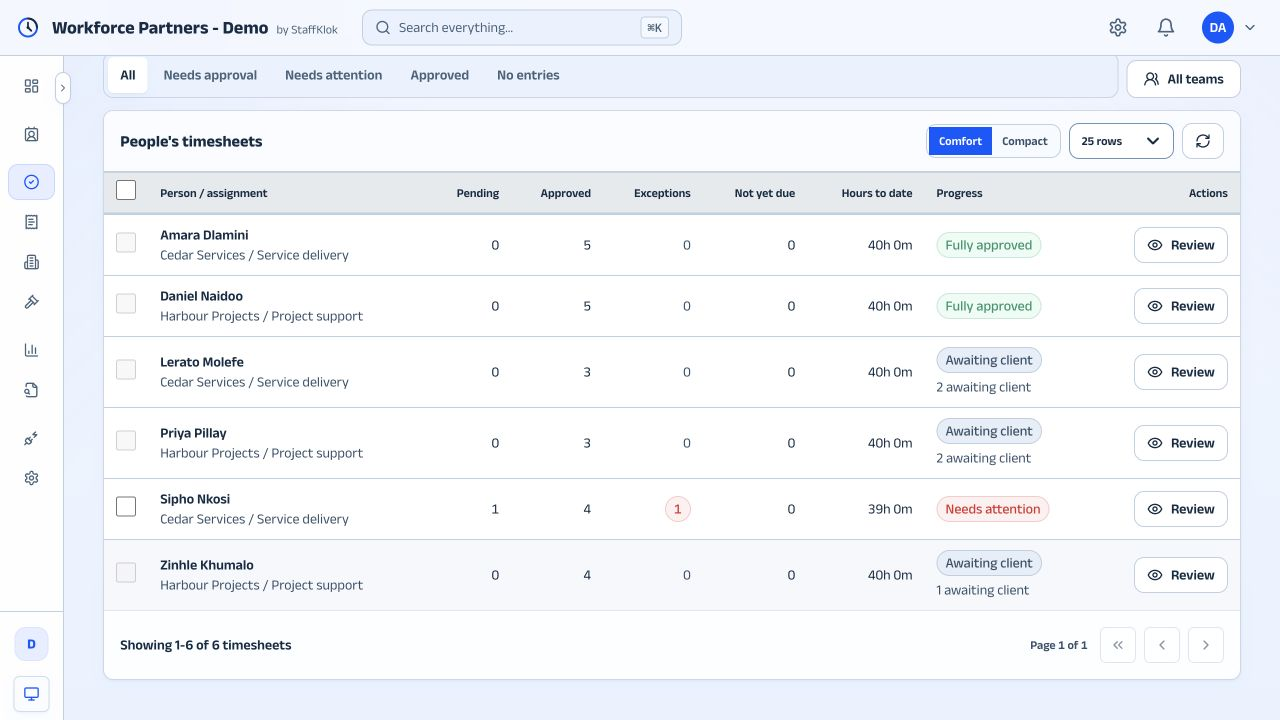
Demo workspace. Fictional people and organisations.
Practical controls for the people responsible for your workforce.
Control who can see staff records and approve time, with access scoped to the right organisation and team.
Capture consent and check face readiness before using an entrance terminal, including assisted enrolment for staff without accounts.
Import staff from spreadsheets and prepare reviewed timesheet exports. File formats and payroll mapping depend on your provider's import process, rather than automatic payroll sync.
Tell us about your team. We will walk through the setup that fits.